BoatUS - Boat Weather & Tides
- 4.5
- Rating
- 100.00K
- Installs
- Free
- Price
 Analysis by App-foxy
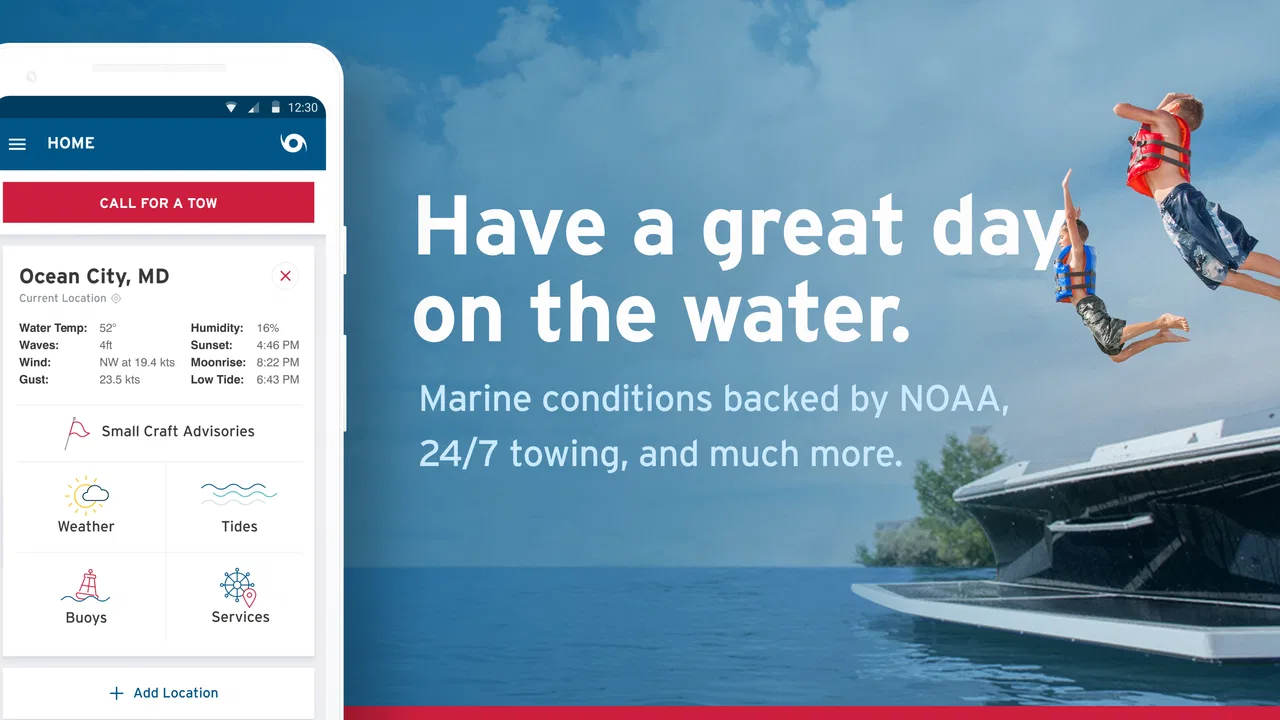
When I am preparing for time on the water, I do not want a weather app that treats a boat trip like a walk across town. Wind direction, changing conditions, tide timing, and the practical question of what happens if something goes wrong all matter at once. BoatUS - Boat Weather & Tides is built around that marine mindset, with BoatUS behind it and a clear focus on boating rather than general daily forecasts.
I found it most useful as a preparation and decision-support tool. It is free, rated for Everyone, and available for Android devices running version 8.0 or later. The app has reached more than one hundred thousand installs, with an average rating of 4.5 from roughly 4,600 ratings. Those figures suggest a well-established niche app, but they do not remove the need to use judgment on the water. A forecast can inform a trip; it should not replace local knowledge, a proper lookout, or a backup plan.
From a boating plan to a safer decision
I find the most useful shift is to treat a forecast as the beginning of a boating decision, not its conclusion. Before leaving, I would connect the weather and tide picture to the route, the crew, and a clear point for turning back; that makes it easier to adjust without pressure. The next section looks at how to keep that planning practical when several people share the preparation.
You May Also Like

 Blood Strike: 2.5 Anniversary
Blood Strike’s Loadouts Turn Every Drop Into a Tactical Gamble
A close look at Blood Strike’s custom loadouts: how fast access to signature weapons reshapes its battle royale rhythm, rewards preparation, and narrows the gap between fights.

 Pandora - Music & Podcasts
Pandora’s Music Is Easy to Start, but Harder to Recover
Pandora’s strength is its low-effort path from a seed to a station. Its weak spot is how much confidence it asks you to place in connection, setup, and quiet recovery.

 8 Ball Pool
 Is Built on Rivalries, Rematches, and Routine
A close look at the rivalries, rematches, shared routines, and unanswered safety questions that turn a quick pool match into a persistent mobile community.

 Samsung Music
’s Quiet Strength Is Playing What You Already Own
Its reach comes less from spectacle than from dependable access to a personal library. That simplicity is both the app’s strongest retention engine and its ceiling.

 AccuWeather: Weather Radar
AccuWeather Review: A Quick, Clear Forecast for Everyday Decisions
For everyday plans, the best forecast is the one you can understand quickly. AccuWeather makes rain timing, radar, and local conditions easy to act on, with a few trade-offs.

 Hill Climb Racing
Why Hill Climb Racing Still Turns Crashes Into One More Run
A tiny car, a bumpy hill and one more upgrade: Hill Climb Racing keeps resurfacing because its simple chaos makes every near-miss feel personal.
More From Our News Desk



Start with the actual situation, not a generic forecast
The first useful change in perspective is choosing a marine weather tool before leaving home instead of relying only on the weather app already installed on a phone. A standard forecast may tell me whether the day looks sunny or rainy, but that is only the beginning of a boating decision. I need to think about the route, the time I expect to be away, the exposure of the water, and how comfortable the crew is with changing conditions.
This is where the app’s identity as a boating-focused weather application makes sense. The store summary points to round-the-clock marine towing and insurance, while the app itself is presented as BoatUS. That combination gives the product a practical context: it is not merely about deciding whether to carry an umbrella. It belongs in the same preparation routine as checking fuel, safety equipment, communications, and the condition of the boat.
My preferred workflow starts the evening before a trip. I use the app to get an early sense of the expected conditions, then I return to it before departure rather than treating the first check as final. If the plan is a short outing close to shore, the forecast may simply confirm that the timing is sensible. If the route is longer or more exposed, I use the same check to identify a point at which I would turn back or stay in port.
Read the information as a sequence
A good marine-weather routine is not just opening an app and looking for a reassuring icon. I first look at the broad pattern, then consider how the conditions may affect the boat and passengers. Wind that feels manageable at the dock can be much less comfortable in open water. A tide window that works for the outward journey may not be as convenient on the return. The useful question is not “Does the day look good?” but “Does this forecast fit my route and my margin for error?”
The weather and tide focus is particularly valuable for users who already think in terms of departure and return times. Tides are not background information for every outing, but when they matter, they can change the practical shape of a trip. I would check them before committing to a narrow channel, a shallow approach, or a schedule that depends on arriving at a particular time. That is a more useful habit than checking conditions only after the boat is moving.
One of my strongest recommendations is to compare the forecast with what I can see and feel locally. The app can help me prepare, but it cannot know every small effect around a harbor, inlet, shoreline, or anchorage. If the wind at the launch point is already stronger than expected, or the water looks rougher than the forecast suggested, I treat that observation as important evidence rather than forcing the plan to match the screen.
Use the app before departure, not as a substitute for onboard awareness
There is a practical handoff between the phone and the boat. Before leaving, the phone is convenient for reviewing the plan and deciding whether the trip is worth starting. Once underway, attention should remain on navigation, people, traffic, and changing conditions. I would not build a safety routine around repeatedly handling a phone while operating a boat.
That distinction matters because a weather application is strongest when it supports a decision before the situation becomes urgent. I like using it to establish a simple rule: if conditions move beyond the crew’s ability or the boat’s comfort, the trip changes. That might mean delaying departure, shortening the route, or returning early. Having that conversation before launch avoids a surprisingly common problem—trying to negotiate the plan only after everyone is tired, wet, or uncomfortable.
Make the handoff to other people explicit
Weather information becomes more useful when it is shared with the person who is actually making the final call. On a family outing, that may be the boat owner. On a fishing trip, it may be the skipper or the most experienced member of the group. I would check the app myself, then explain the practical conclusion in plain language: when we plan to leave, when we plan to return, what conditions concern us, and what would make us change course.
This is also a good place to involve less experienced passengers. They do not need a technical lecture, but they should know that a pleasant start does not guarantee a pleasant return. If the forecast is borderline, I would tell everyone in advance that the route may be shortened. That small handoff reduces pressure on the person in charge and makes an early return feel like part of the plan rather than a failure.
For a boating group, the app therefore works best as one stage in a chain: the forecast informs the skipper, the skipper adapts the route, and the crew understands the limits. The application does not replace those handoffs. It makes them easier to begin because the conversation has something concrete to discuss.
A realistic weekend scenario
Imagine I am planning a Saturday morning trip with two friends. We want to leave early, spend several hours on the water, and return around midday. The night before, I use the app to examine the expected marine conditions and tide timing. The initial plan looks reasonable, but I notice that the return period deserves more attention than the departure. Rather than focusing only on the calmest part of the morning, I ask whether the boat and crew will still be comfortable later.
In the morning, I check again before loading the final gear. If the conditions still fit the plan, I tell my friends the intended return time and the point at which we will turn around. If the forecast has become less favorable, I do not need to cancel every possibility. I can choose a shorter route, remain closer to shelter, or postpone the outing. That is the kind of practical outcome I want from a weather app: not a dramatic prediction, but a better decision.
During the trip, I compare the forecast with reality without becoming dependent on the screen. If the wind builds earlier than expected, the decision is already clear because the return limit was discussed beforehand. The app helped create the plan, but observation and judgment complete it.
Where this app fits beside usual alternatives
A general weather app is often faster for checking temperature, rain, and broad daily conditions. I still use one for ordinary errands. It may also be preferable when I only need a quick answer about clothing or a land-based appointment. For a boating trip, however, a marine-oriented tool has a more relevant starting point because it puts weather and tides in the same conversation.
Dedicated marine instruments, local harbor information, radio broadcasts, and experienced boaters remain important alternatives or companions. A phone app is convenient, but convenience is not the same as complete coverage. If I am planning a demanding passage, entering unfamiliar waters, or dealing with rapidly changing conditions, I would want more than one source and would not rely on a single phone display.
The trade-off is simplicity versus context. BoatUS - Boat Weather & Tides is more targeted than a basic forecast, but it still asks me to interpret what the conditions mean for my particular boat. That is a strength for users who want marine relevance without building a complicated planning system, and a limitation for anyone expecting the app to make the route decision automatically.
What the developer and version details mean in practice
BoatUS is the developer, which gives the app a clear connection to boating rather than a generic weather brand. The current version is 4.12.3, and the app was released on March 6, 2017. I see that long presence as useful context: this is not a newly appeared experiment, but an established app that has had time to remain part of a boating workflow.
The free price makes it easy to try before deciding whether it deserves a permanent place in a trip-preparation routine. That matters because the best test is personal: check the waters where you actually boat, see whether the presentation suits your planning style, and decide whether it adds value beyond the tools you already use. Since it is rated for Everyone, it can also be a straightforward option for a household where different people help prepare the outing.
Compatibility is worth checking before a trip. The minimum operating system is Android 8.0, so an older device may not be suitable. I would install and open the app at home, while connected and unhurried, rather than waiting until the launch ramp. That simple step avoids turning a compatibility or setup problem into a departure-day distraction.
Small workflow improvements that make it more useful
The first improvement is to check twice: once during planning and again shortly before departure. A single early look can create false confidence, especially when the trip lasts long enough for conditions to change. The second is to evaluate the return, not just the start. Many pleasant outings become uncomfortable because the crew planned around the easiest part of the day.
The third is to turn information into thresholds. Instead of vaguely saying that the weather “looks fine,” I decide what would cause a delay, a shorter route, or an early return. This makes the forecast actionable and reduces arguments when the conditions are less attractive than hoped.
The fourth is to pair tide information with the physical route. A tide time has little meaning by itself; it matters because of where I intend to go and when I expect to pass through. I would write down the relevant timing in my trip notes and discuss it with the skipper, rather than assuming that opening the app once means everyone understands the plan.
The fifth is to keep a backup source and basic offline-minded habits. I do not assume that a phone will always be convenient, readable, charged, or connected at the moment I need it. The app can be an excellent planning aid, but responsible boating still includes communication equipment, local awareness, and a willingness to abandon the original itinerary.
Where the flow breaks down
The workflow breaks when a user treats a clean interface or favorable forecast as permission to ignore the environment. Marine conditions are local and personal: the same day can feel easy to one crew and unpleasant to another. A small boat, inexperienced passengers, or a route with limited shelter can make a moderate forecast a poor match. The app cannot remove those differences.
It also breaks when the plan contains no handoff. If one person checks the forecast but nobody else knows the return target or the fallback plan, the information stays trapped on one phone. I would rather spend a minute explaining the decision than assume the group will infer it. That is especially important when children, guests, or first-time passengers are involved.
Another weak point is overextending the app beyond its role. I would not use it as a replacement for navigation equipment, seamanship, local notices, or emergency procedures. Its marine-weather purpose is valuable, but it is still one component of a larger system. Users looking for detailed route planning, extensive chart work, or a complete onboard command center may be better served by a specialized navigation solution, while keeping this app for weather and tide checks.
Finally, the free entry point can encourage casual use without enough preparation. Because it costs nothing to install, it is tempting to open it only when a trip is already underway. I think that misses its best value. The strongest result comes when the app changes the plan early enough to make the safer choice easy.
Who should use it, and who should skip it?
I would recommend BoatUS - Boat Weather & Tides to recreational boaters who want a focused marine-weather check without beginning with a complex navigation suite. It is a sensible fit for day trips, family outings, fishing plans, and anyone who wants tide timing to be part of the same pre-departure conversation as weather. It is also useful for newer boaters who are learning to connect forecast information with route length, shelter, and crew comfort.
I would be more cautious about recommending it as the only tool for demanding trips. Experienced skippers may already have a broader collection of marine sources and instruments, and they should continue using them. Someone who only wants a general city forecast may find a regular weather app quicker. Likewise, a user expecting automatic go-or-no-go advice may be disappointed, because the meaningful decision still belongs to the person who understands the boat, route, and crew.
My final assessment
After using it as part of a realistic boating routine, I see the main value in the connection between forecast checking and practical action. The app encourages me to ask better questions: When should we leave? What will the return be like? Does the tide fit the route? Who knows the fallback plan? Those questions are more useful than a simple good-weather or bad-weather label.
Its limitations are equally important. It does not make local judgment unnecessary, and it should not become the sole source for serious decisions. The phone is only the first handoff in the process; the final result depends on the skipper’s interpretation and the crew’s willingness to change plans.
My recommendation is straightforward: use it before the boat moves, use it again before departure, and turn what you see into a clear plan. For a free weather app from BoatUS with a marine focus, that is a practical role and an honest one. It will not replace seamanship, but it can help a prepared boater notice the right issues early and return to shore with fewer surprises.
FAQs for BoatUS - Boat Weather & Tides
01What features does the BoatUS app offer?
The BoatUS app provides a comprehensive suite of features, including real-time weather updates, tide charts, GPS navigation, and access to the BoatUS directory for services like towing. Additionally, it offers alerts for changing weather conditions and a feature to track your boating trips. The app is designed to enhance safety and convenience for boaters.
02Is the BoatUS app available for both Android and iOS devices?
Yes, the BoatUS app is available for both Android and iOS platforms. Users can download the app from the Google Play Store for Android devices and from the Apple App Store for iOS devices. This ensures that a wide range of users can benefit from its features regardless of their device preference.
03How accurate are the weather and tide predictions in the BoatUS app?
The BoatUS app utilizes advanced meteorological data to provide accurate weather and tide predictions. It sources information from reliable services to ensure that users receive up-to-date and precise forecasts. However, it's always a good idea to cross-check with local weather advisories for the most comprehensive insights.
04Is there any cost associated with using the BoatUS app?
The BoatUS app is free to download and use, offering a range of features at no cost. However, additional services, such as premium weather updates or towing services, might incur extra fees. Users should check the app for any in-app purchases or subscriptions that may be available.
05Can the BoatUS app be used offline?
While the BoatUS app provides extensive features online, certain functionalities like GPS tracking and previously downloaded maps can be accessed offline. However, for real-time weather updates and tide information, an internet connection is required to ensure accuracy and timeliness.
Pros
- Easy-to-navigate interface for quick access.
- Accurate real-time weather updates.
- Customizable alerts for weather changes.
- Detailed tide information for planning trips.
- Offline access to saved data.
Cons
- Limited features in the free version.
- Occasional delays in data updates.
- Requires GPS for full functionality.
- Battery drain with continuous use.
- No integration with other marine apps.

BoatUS - Boat Weather & Tides
Gallery